Skip to content
ChannelDesk
Self-hosted · Fair-code · No telemetry

Chat to your fleet. Watch it act.

ChannelDesk is the AI-native control desk for your home network. Enroll any machine over SSH, turn chat commands into live flows and one-tap quick actions, and watch real Claude Code agents do the work — across every host and cluster you own.

Fair-code · Self-hosted · Your keys, your data · No telemetry
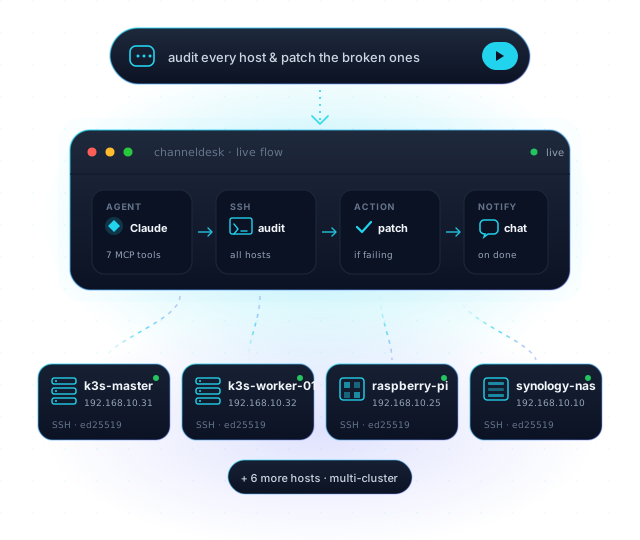
ChannelDesk turns a chat command into a live flow — agent, SSH, action and notify nodes — fanning out over SSH to a fleet of labelled machines.
6
MCP servers
3
live integrations
0
telemetry calls
Build from anywhere

Real projects. From wherever you happen to be.

The dashboard ships as an installable PWA. Your homelab has the keys, the SSH access and the project source — you drive it from your phone, your laptop, or a hotel browser. Claude Code runs on your cluster, not in a SaaS tab, with full filesystem and tool access.
  • Code — drive Claude on real repos. Edit files, run tests, open a PR — from your phone.
  • Ops — spin up an agent for any one-off task on any machine in your network.
  • Monitor & auto-fix — agents that watch a host and fix problems on their own, or send a report when they can't.
  • PWA mechanics — optimistic UI, offline shell, touch-tuned, push-ready. No third-party in the loop.
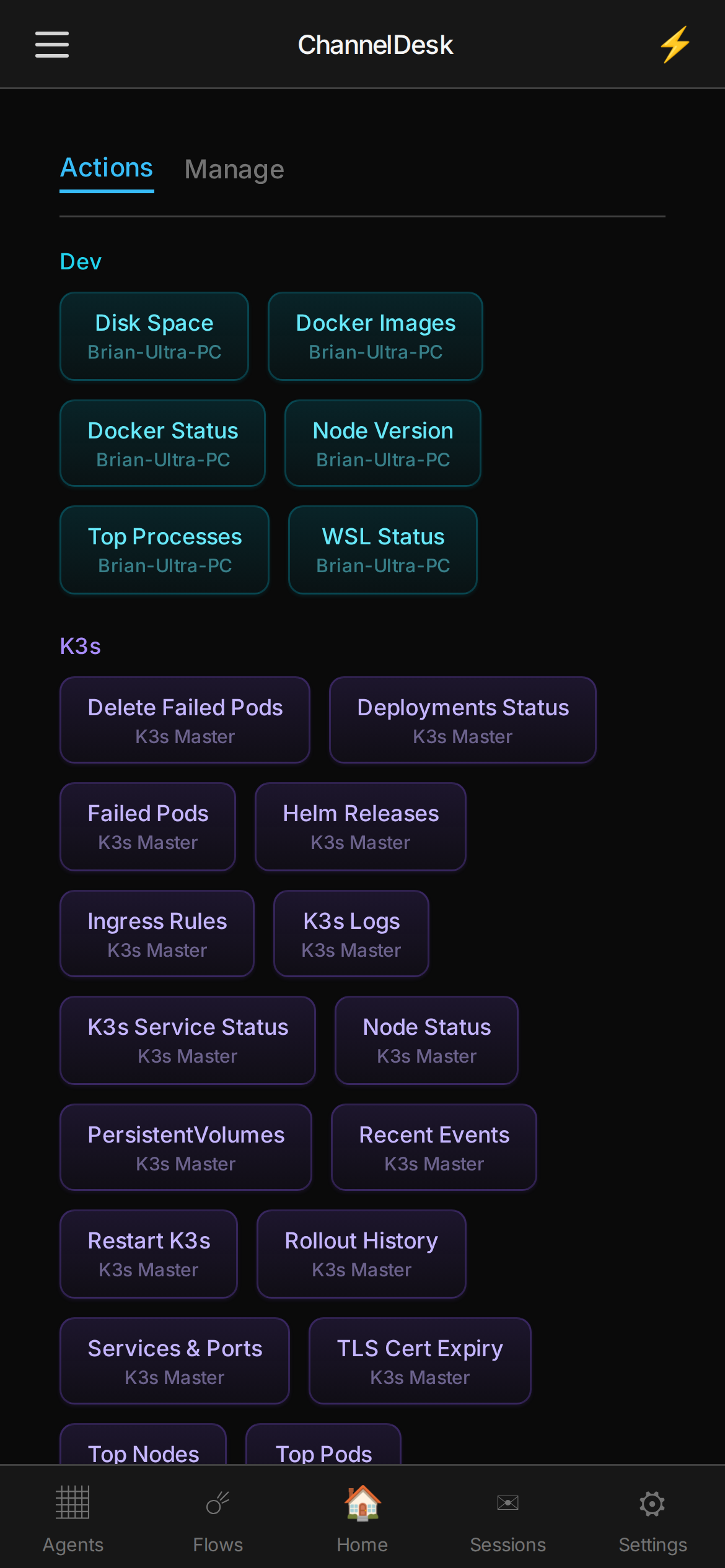
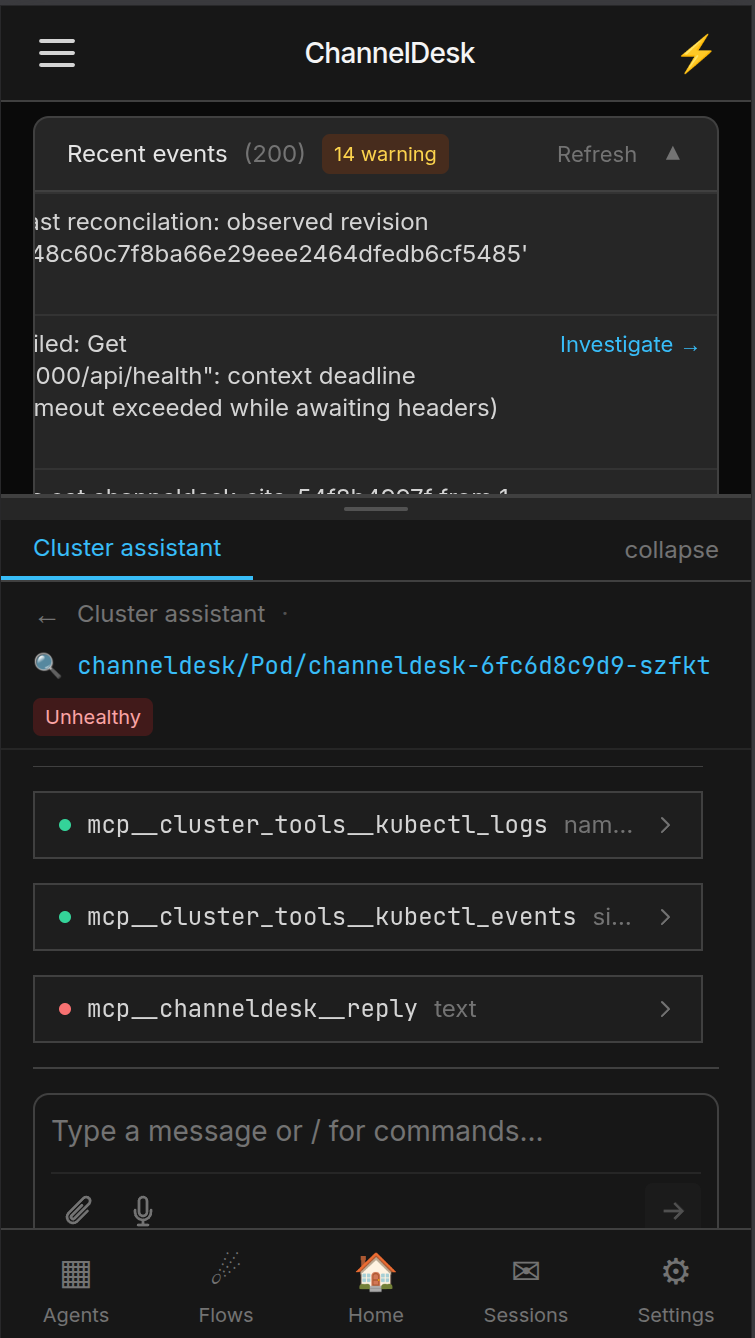
ChannelDesk PWA on mobile — Recent Events with an Investigate flow opening the Cluster assistant chat dock, where Claude is analyzing an unhealthy channeldesk pod with kubectl_logs and kubectl_events
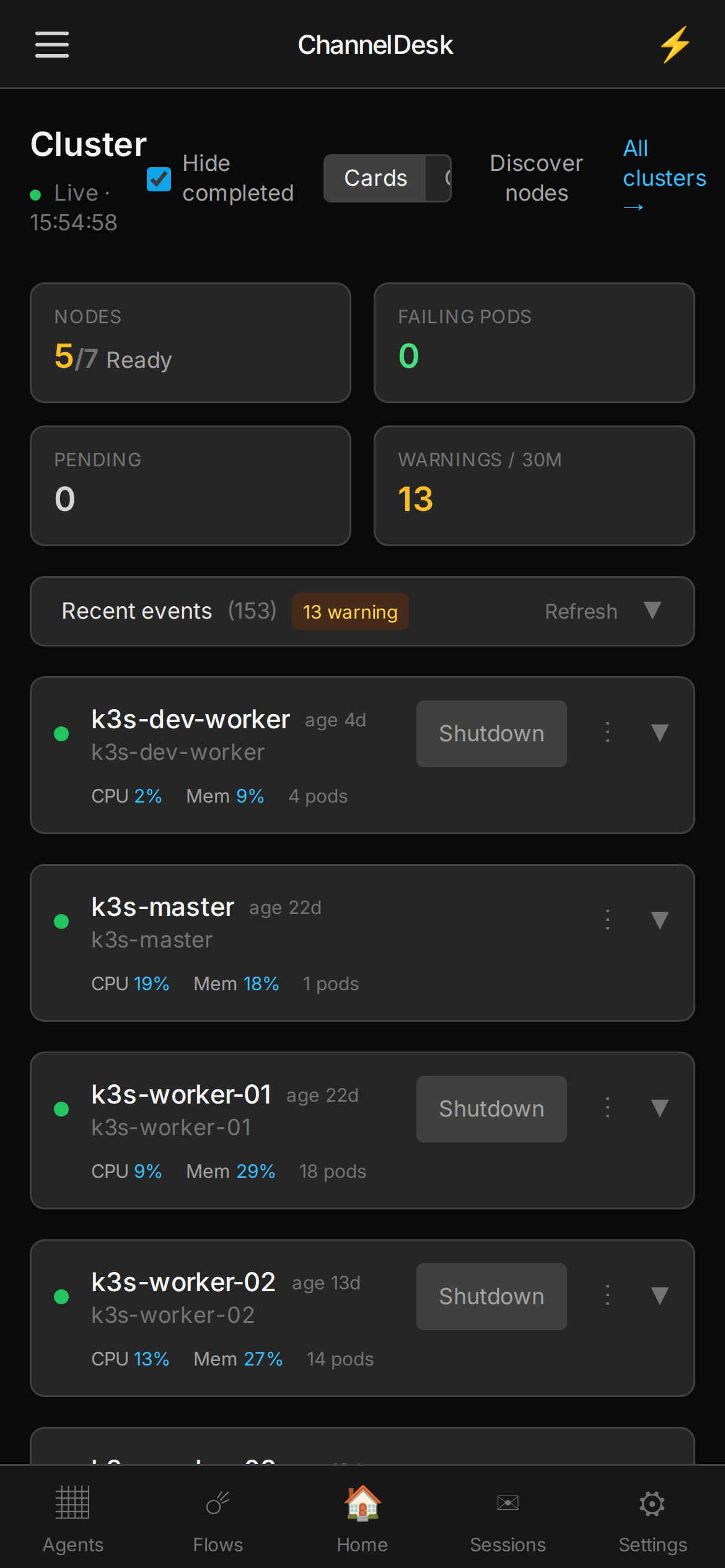
ChannelDesk PWA on mobile — Cluster page with k3s node cards, CPU/Mem and Wake/Shutdown controls
ChannelDesk PWA on mobile — Quick Actions categorized by host, one tap from anywhere
/agents/marketing-site · session from Brian's phone
Add a section about how ChannelDesk lets you build from anywhere. We need to land that this isn't just code — ops and monitoring too.
Done. Reframed the PWA section into “Build from anywhere” with three hooks (code · ops · monitor & auto-fix), built clean, opened PR #21 against brian/channeldesk-site. Permission relay fired before the push; you allowed it from the chat dock.
The section above this one is the section we just built. From a phone.
What is ChannelDesk

One control desk for every agent, flow and device you run.

Most homelabs are a graveyard of one-off scripts, expired tokens and Telegram bots that work until they don't. ChannelDesk replaces them with a single, opinionated stack: an orchestrator that spawns real claude-code subprocesses, a PWA that gives you a room-centric control desk, and an MCP relay that plugs both into your devices.

It runs on the boring stack you already trust — Postgres, Redis, k3s — and ships as a single Docker Compose file or a Kustomize bundle. No SaaS account, no phone-home, no proprietary runtime. The whole thing ships under a Sustainable Use License (n8n's, drop-in) and lives in a GitHub repo you can fork.

/flows · chat tab
Watch every worker for disk pressure and tell me before it fills up.
Done. Created flow disk-pressure — cron every 5 min → SSH to cluster:workersclaude-code step → notify on /activity. Open in canvas →
No YAML. No defineFlow. The flow lives as nodes you can edit visually.
0
MCP servers shipped
SSH hosts you can enroll
sessions per box
0
bytes sent home
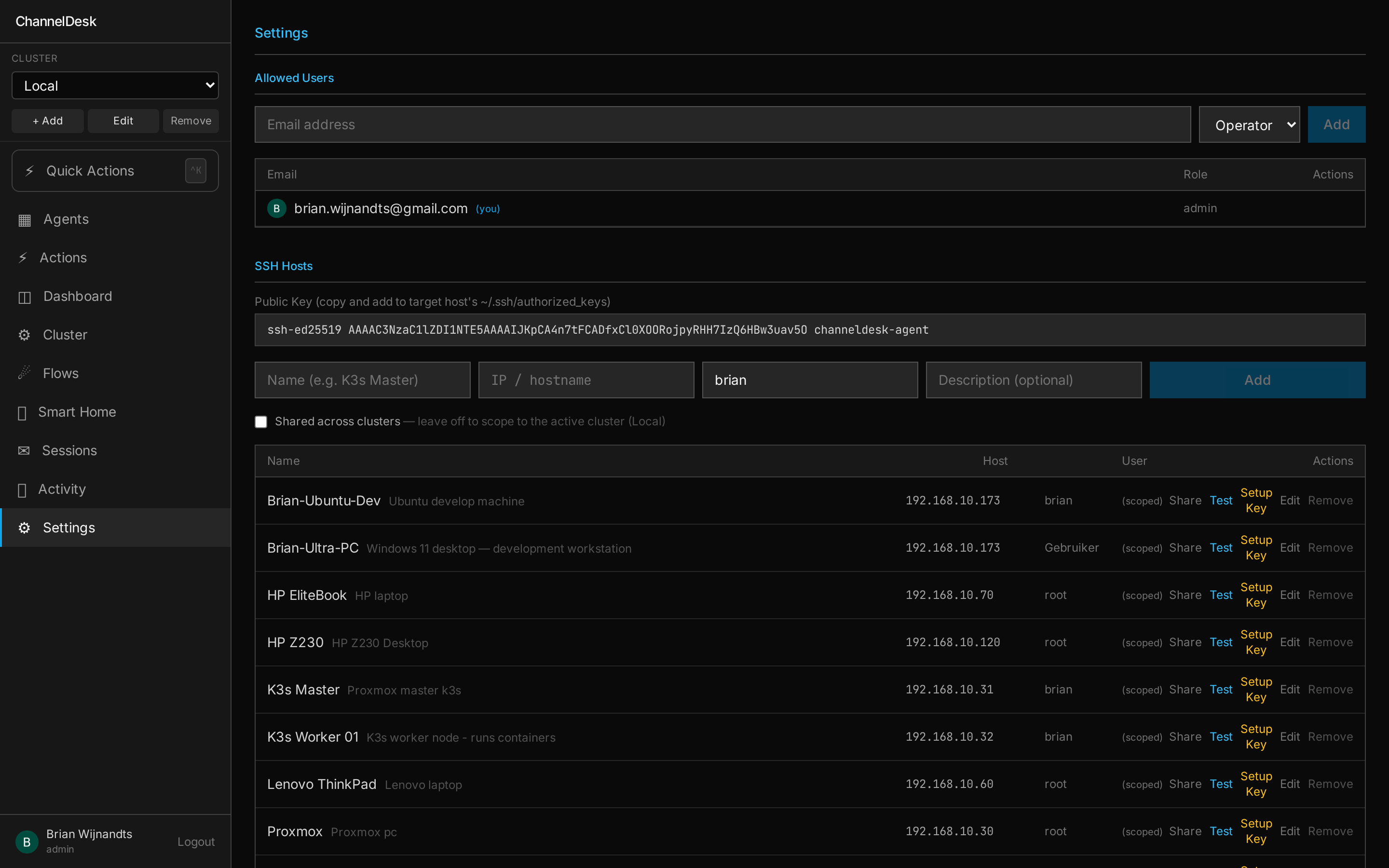
/settings · SSH hosts
ChannelDesk Settings — SSH Hosts panel listing enrolled machines (k3s-master, k3s-worker-01, raspberry-pi, synology-nas) with status indicators, last-seen timestamps and an Add Host button
00 / Fleet · SSH

One password. Every box, forever.

Enroll a machine with a one-time password — ChannelDesk hands it an ed25519 key, stores the fingerprint, and from then on agents chat to it directly. One host, a whole rack, or two clusters across two houses — same desk, same chat, same Quick Actions.
  • One-time password enrolls the host, stored keys do the rest
  • Agents address one machine, a tag, or every host you own
  • Multi-cluster — fan out to k3s, bare-metal, NAS and Pi from one chat
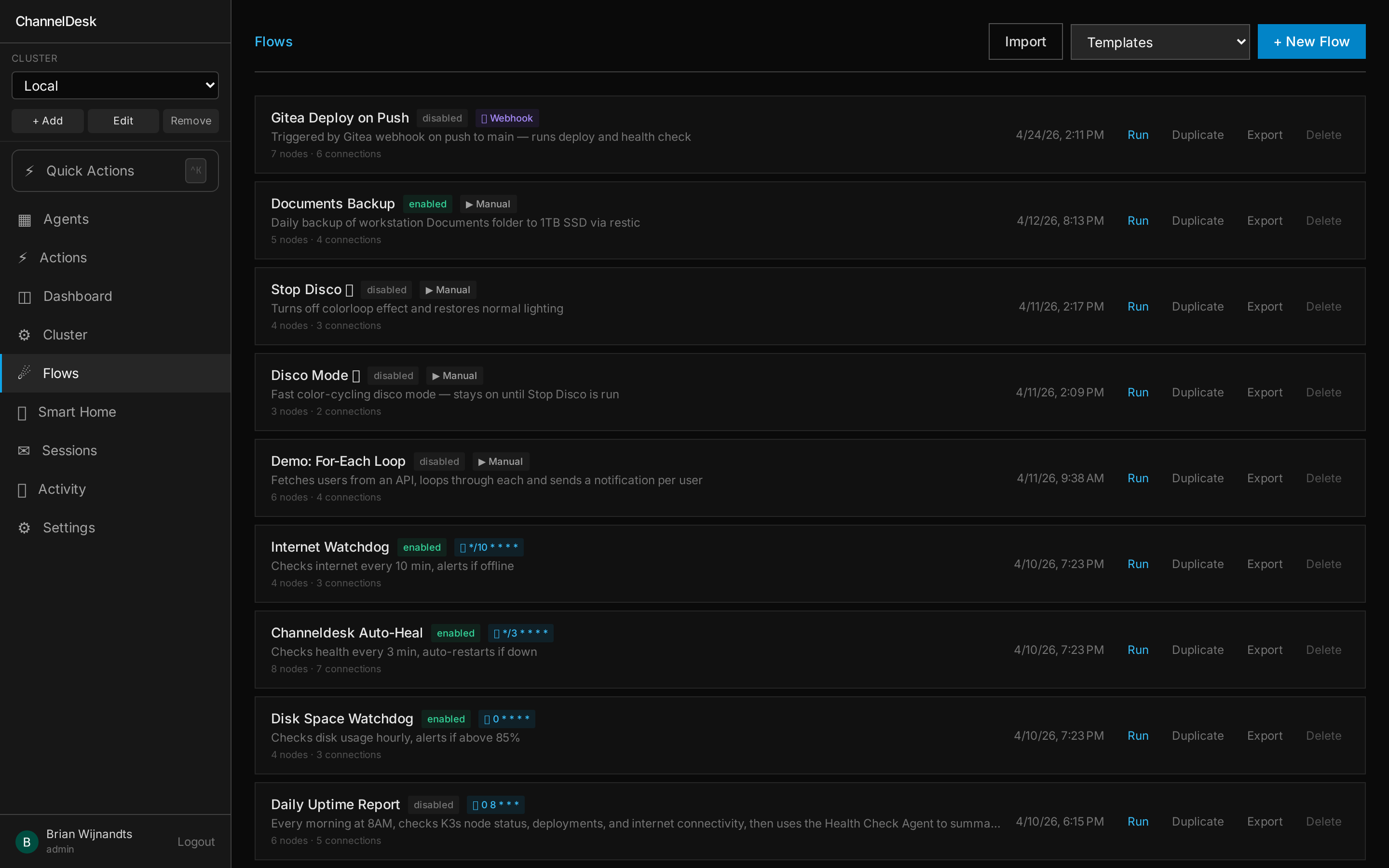
/flows
ChannelDesk Flows — list of automations with cron, webhook and manual triggers, plus enabled/disabled state
02 / Flow Engine

Triggers, conditions, LLM steps. One engine.

Cron, webhook, device events and manual runs all flow through the same node graph. A flow can call an LLM step, branch on its output, then dispatch device commands — and the whole run is replayable.

See the Flow Engine →
How it works

Four steps from clone to live agent.

  1. Clone git clone
  2. Keys cp .env.example .env
  3. Compose docker compose up
  4. Talk /cluster — live
01

Clone the repo

git clone github.com/channeldesk/channeldesk. The whole stack is one NX monorepo — orchestrator, channel-server, frontend and MCP packages.
02

Drop in your keys

Copy .env.example to .env, paste your ANTHROPIC_API_KEY and any integration creds you actually use. That's the only secret-handling you do.
03

Bring up the stack

docker compose -f docker-compose.yml up -d spins up Postgres, Redis, the orchestrator and the dashboard. On k3s, point Flux at the Kustomize bundle and you're done.
04

Talk to your homelab

Open the dashboard, drop a message in the inbox, and Claude Code is now running on your box with full MCP tool access — sessions are live, streamed and resumable.
Cost control

Your Claude subscription. Your cost ceiling.

ChannelDesk doesn't bill you per token. It drives the local claude CLI signed in to your existing Pro or Max subscription — so a session that would cost €40 on the metered API costs you exactly what your monthly plan already costs. No surprise bills, no "oops we left a flow running overnight", no API key roulette.

Other hosted agents Metered API

Pay per token. Forever.

  • × Long flows = ballooning bills you can't predict
  • × An infinite-loop bug bills your credit card directly
  • × Anthropic API key sits on a third-party server
  • × No relationship with the model provider — only the middleman
ChannelDesk Claude CLI · your subscription

Pay your monthly plan. That's it.

  • Sessions consume your existing Pro/Max plan — no extra metering
  • A runaway flow hits your plan's rate limit, not your credit card
  • CLI auth stays on your machine — ChannelDesk never sees it
  • Direct, official Anthropic relationship — no third-party proxy
How it works

claude-code as a subprocess, signed in once.

ChannelDesk runs the official Claude CLI on your box. You log in once with claude login — using the same Anthropic account that powers Claude.ai — and the orchestrator spawns subprocesses against that session. The Claude CLI re-prompts for a fresh login about every 3 days; ChannelDesk surfaces that on the sessions page so you never get caught out.

~/$ claude login
 opening browser to claude.ai
 account: [email protected]
 plan: Max (200×)

session token saved to
~/.claude/credentials.json

// channeldesk now uses this
// for every spawned agent.
Code health

We hold ourselves to the same bar.

Every push to master runs a SonarQube scan. The badges below come straight from channeldesk.hubje.nl/api/badges/… — live, not cached.

SonarQube quality gate status SonarQube coverage SonarQube security rating SonarQube reliability rating SonarQube maintainability rating SonarQube duplicated lines
3,622
tests across the monorepo
97 / 99%
FE / BE coverage
A/A/A
security · reliability · maintainability
100%
security hotspots reviewed

Internal SonarQube project · public read-only badge token · numbers above reflect last passing scan on master.

Self-host ChannelDesk in 10 minutes

Clone the repo, drop your SSH keys, and chat to your fleet from your own box. No SaaS account, no metered bills, no telemetry.